1. Download the required IPSW file here on your MacBook: https://updates.cdn-apple.com/2019/ios/091-25277-20190722-0C1B94DE-992C-11E9-A2EE-E2C9A77C2E40/iPhone_4.0_32bit_10.3.4_14G61_Restore.ipsw
2. Turn off your iPhone 5c completely.
3. Press and hold the Home button right after connecting your iPhone 5c to your MacBook via a USB cable.
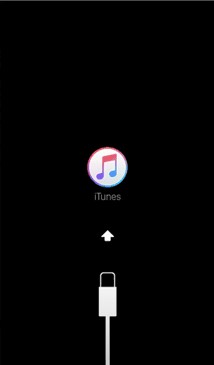
4. When it shows a screen similar to this one, release your finger and open the Finder app on your MacBook.
5. Click on your iPhone in the Finder app.
6. Close any popups and click the "Restore iPhone..." button while holding the Option key on your keyboard and select the IPSW file you downloaded in step 1.
7. Confirm the operation to start the process and wait until the process is complete.
8. If you encounter any issues or just have any questions, feel free to reply to my comment.